noscript-img
HomeAboutLinux NewsResourcesPrivacy
My Computer Tips Home

Change the preferred applications in Linux Mint mate

ID: 302

Category: Linux Mint

Added: 2nd of March 2022

Updated On: Tutorial updated and rechecked on 21st of February 2026

Views: 2,059

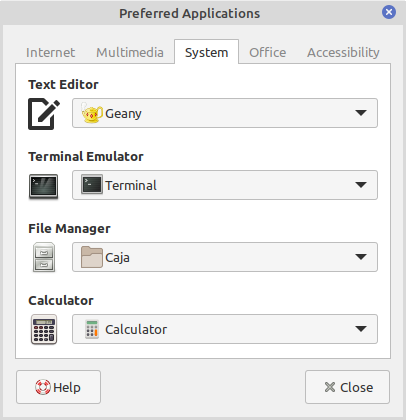
I edit code using Geany. When you use Linux Mint mate for the first time, you might find this opens in a heavy application like LibreOffice Writer instead. To solve this issue, you can use the Preferred Applications utility in Linux Mint.

While the specific tool may vary if you are using a different Linux distribution or window manager, the general process remains the same.

In the Linux Mint menu go to Preferences >> Preferred Applications
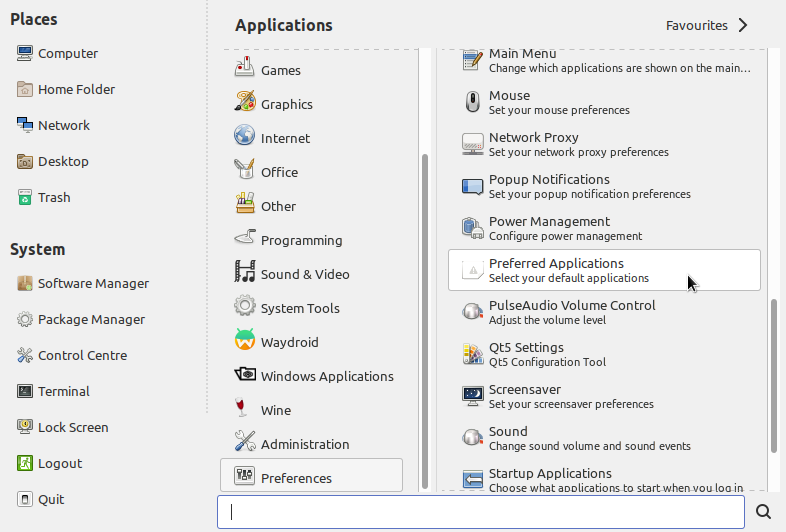

Or open your terminal and enter the following command
mate-default-applications-properties

Once opened setting the preferred / default application is pretty straightforward.

You can change the default applications for the following categories:
Web Browser
Mail Reader
Instant Messenger
Image Viewer
Multimedia Player
Video Player
Text Editor
Terminal Emulator
File Manager
Calculator
Document Viewer
Word Processor
Spreadsheet Editor
Visual
Mobility

Affiliate DisclosureSitemap Valid CSS!